






Your plugin. Your hosting. Your WordPress site.
Keep your studio on WordPress
You keep clients, booking, invoices, and galleries on your site, choose your hosting, and collect through your Stripe or PayPal.
Free to install. No card, just your name and email.
A preview of the Mankai admin. A new booking arrives for a family session, the session fills in as the contract, retainer and questionnaire are done, an invoice fills in and is paid, and a client picks favorite photos in a gallery.
What you get with it


Around it
Works with the tools you already use
Keep your WordPress theme and page builder. Card payments go to your own Stripe or PayPal account. FluentSMTP sends your email, and Koko Analytics counts your website visitors.
- WordPress
- Gutenberg
- Elementor
- Stripe
- PayPal
- FluentSMTP
- Koko Analytics


The rest of the week
Everything else you need each week
Messages, forms, contracts, and the emails that go out on their own. Each page says what is in Free and what needs Pro.
Sessions The contract, the balance, and the gallery sit on the same job.Client portal Clients log in to your website, not a rented portal.Workflows Reminders send on their own. Build your own workflows with Pro.


Payments Card payments go straight to your Stripe or PayPal account.Contracts Contracts fill in from the job, and clients sign in their portal.
Galleries Your gallery files stay on your own hosting.
 ♥
♥
 ♥
♥
 ♥
♥
MessagesClient messages sit next to their booking and balance.

WordPress
It runs on your WordPress
You install the Mankai plugin on hosting you choose, keep your data on your site, and never rent a studio login.
With Mankai
- Your domain and WordPress site
- Your database and media files
- Your Stripe or PayPal account
- Turn the plugin off and your data stays put


Get your studio running
Start for free. No credit card, and you can change plans anytime.
(Save up to 20%)
Free
Clients, booking, galleries and invoices on your own site.
$0 / year
Free for good
Try nowFree includes
- Clients, sessions, and booking
- Galleries and the client portal
- Invoices and payments
- Print shop
Best for most
Pro
Everything a working studio needs, with quotes, workflows and reports.
$249.99 / year
Billed yearly
Buy nowEverything in Free, plus
- Quotes
- Custom workflows and emails
- Advanced forms
- Reports
Developer
Pro on several sites, for agencies and studios with more than one brand.
$699 / year
$139.80 a site, billed yearly
Buy nowEverything in Pro, plus
- Pro on every site
- One license and one renewal
- Move a license to another site
- A lower price for each site
Setup
I install Mankai, brand it to your studio and move your clients over.
$799.99 once
One payment
Request setupSetup includes
- Install and branding
- Booking, forms, and payments
- Workflows and templates
- Help moving what you use now
Not sure which plan is right for you?
Compare plansRecommended for you
Free ideas, templates and tools for running your studio.
-
 Session ideas
Family photoshoot ideas
Families do best with simple things to do, not poses to hold. These ideas give everyone a job and keep the kids moving.
Session ideas
Family photoshoot ideas
Families do best with simple things to do, not poses to hold. These ideas give everyone a job and keep the kids moving.
-
 Free template
Portrait photography contract
A short, plain contract for family, couples, senior and newborn sessions, with retainer and reschedule terms.
Free template
Portrait photography contract
A short, plain contract for family, couples, senior and newborn sessions, with retainer and reschedule terms.
-
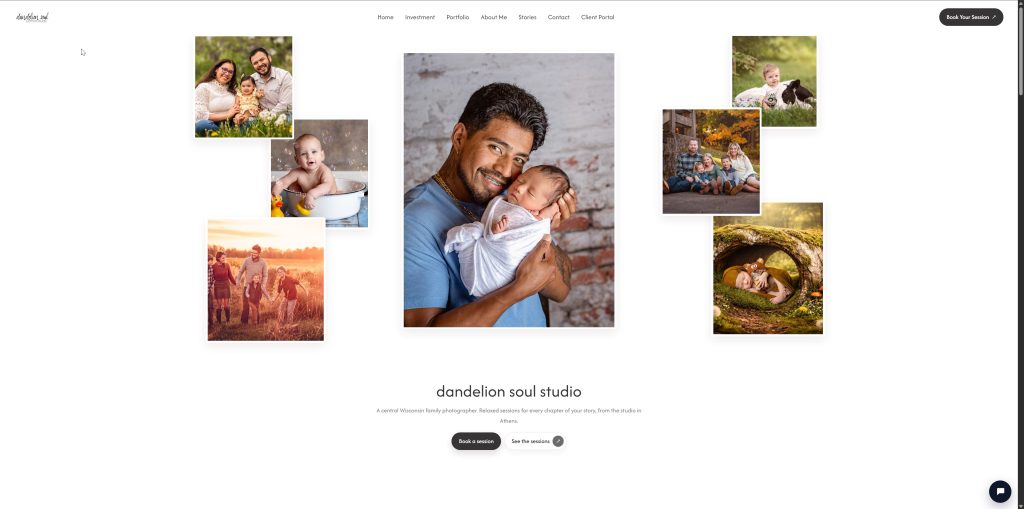 Example site
Dandelion Soul Studio
A real photography studio running Mankai.
Example site
Dandelion Soul Studio
A real photography studio running Mankai.
-
 Free tool
Invoice maker
Fill it in and download a clean PDF invoice. Nothing you type leaves your browser.
Free tool
Invoice maker
Fill it in and download a clean PDF invoice. Nothing you type leaves your browser.
-
 Session ideas
Couples photoshoot ideas
Most couples are nervous in front of a camera. Give them something to do together and the connection shows up on its own.
Session ideas
Couples photoshoot ideas
Most couples are nervous in front of a camera. Give them something to do together and the connection shows up on its own.
-
 Free template
Wedding photography contract
A short, plain wedding contract: coverage, payments, overtime, cancellation and image rights.
Free template
Wedding photography contract
A short, plain wedding contract: coverage, payments, overtime, cancellation and image rights.
-
 Free tool
Quote maker
Price a session and download a clean PDF quote in a minute.
Free tool
Quote maker
Price a session and download a clean PDF quote in a minute.
-
 Session ideas
Senior picture ideas
Seniors want photos that look like them. Build the session around their interests and a few places they actually spend time.
Session ideas
Senior picture ideas
Seniors want photos that look like them. Build the session around their interests and a few places they actually spend time.
-
 Free template
Mini session contract
A short contract for mini sessions: one time slot, paid in full at booking, limited changes.
Free template
Mini session contract
A short contract for mini sessions: one time slot, paid in full at booking, limited changes.
-
 Session ideas
Newborn photoshoot ideas
Newborn sessions run on the baby's schedule, and safety comes first. Keep every pose simple and keep the baby supported at all times.
Session ideas
Newborn photoshoot ideas
Newborn sessions run on the baby's schedule, and safety comes first. Keep every pose simple and keep the baby supported at all times.
-
 Free template
Photography model release
A one-page model release for adults, with a short option for a minor signed by a parent or guardian.
Free template
Photography model release
A one-page model release for adults, with a short option for a minor signed by a parent or guardian.
-
 Session ideas
Maternity photoshoot ideas
Maternity sessions work best between 32 and 36 weeks. Keep clients comfortable, take breaks, and make the bump the center of the frame.
Session ideas
Maternity photoshoot ideas
Maternity sessions work best between 32 and 36 weeks. Keep clients comfortable, take breaks, and make the bump the center of the frame.
FAQ
Frequently asked questions
Does Mankai require WordPress?
Yes. It is a WordPress plugin. You install it on hosting you control.
How difficult is setup?
Installing is a normal plugin upload, and a setup wizard walks you through the basics. You still need hosting you control, PHP 8.1 or newer, WordPress 6.4 or newer, a mail plugin like FluentSMTP so your email reaches inboxes, and Stripe or PayPal if you take card payments. Setup & Migration is available after you have the plugin.
Which payment processors are supported?
Stripe and PayPal, through your own accounts. One processor takes payments at a time. You can also record cash, checks, and bank transfers by hand. There is no Square today. Mankai adds no fee on top of the processor's.
Is there a native mobile app?
No App Store app. You and your clients use Mankai in the browser, and it works on a phone. Pro adds a staff phone app that you install from your own site.
Where does client data live?
In your WordPress database, on your hosting. Uninstalling Mankai does not delete it unless you turn that option on.
What if my license lapses?
If Pro runs out, you go back to the free features. You are not locked out, and nothing is deleted. Your clients, sessions, galleries, and files stay. You can't start new quotes, coupons, or gift cards or add expenses until you renew, and the ones you already made keep working. On the Pro download, the Overview shows an Activate your license card until you renew.
What stays my responsibility?
Hosting, backups, WordPress updates, domain DNS, and email deliverability. Plugin updates are covered with an active license.
Put it on your WordPress
Install the free plugin on the site you already run. Add Pro when you want the rest.